LEP
Literate Programming for Eclipse
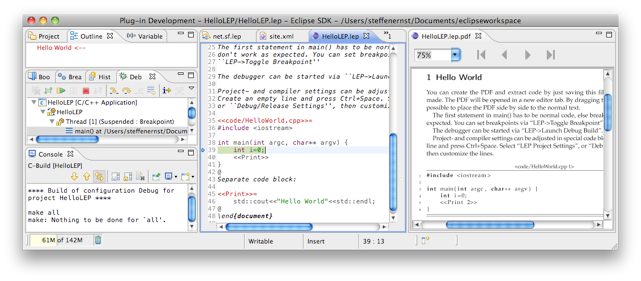
Literate Eclipse Programming assists developers in
writing structured, well documented source code. LEP
integrates automated extraction of source code and
documentation into a familiar eclipse environment.
Compiling and debugging are fully supported.
Get It
Missing a feature?
Found a bug?
Need help?
Tutorials
About
Changelog
12.10.17 --- 0.5.29
- fixed unexpected switching of editor tabs while working with included lep files
5.10.17 --- 0.5.27
- fixed bug with include files from subfolders
5.4.17 --- 0.5.26
- added French translation for block descriptions, thanks to Aymeric Meindre
4.4.17 --- 0.5.24
- added posibility to customize translation of block description, see
File based settings
- fixed default text for included clodeblocks, was "on page", now "from page"
27.3.17 --- 0.5.22
- improved replacement of quotes, for details, see
File based settings
- new option "blockIndex" to create an index of all codeblocks, see
File based settings
- fixed a bug with underscores in codeblock filenames
6.3.12 --- 0.5.21
- add option to fold all line and range comments:
use "Fold all comments by default" from the preferences
to collapse all comments to a single line by default.
Add "hideCommentsFromDocu = true"
to LEPSettings to replace comments with empty lines in the PDF.
This can than be removed from the PDF with the
listings-Option "emptylines=0". For details, see
File based settings.
- codeblocks can be disabled by adding a star to the end of the first line,
e.g., <<Name of block>>=*. This single block is neither
written to code files nor to the pdf. If this block consists of other parts
with the same name, those aren't influenced, neither are references to
this block.
14.1.12 --- 0.5.20
- fixed bug with detection of global escape characters
- the coderef setting is now also used to format lines with
included block names that use escape characters
12.1.12 --- 0.5.19
- eased usage of escape characters, global and local ones are detected
and used to pretty print the names of included codeblocks, no need to
write something like %% behind a line anymore
- if an escape character is set, a page reference is added to included
codeblocks, instead of writing an "included blocks"-info below
- add folding support for lepsections, all or just ones without a "*"
are folded automatically every time the document is saved, see the
preferences
27.11.11 --- 0.5.18
- fixed new bug from the last version, where a preceding space was added to settings
like the code folder, which than lead to two code folders, e.g., "code" and " code"
- add error message in case the pdf editor fails to load a file, which should prevent
eclipse to crash in such cases
26.11.11 --- 0.5.17
- improved api extraction functionality:
filtering of sections can be prevented by adding a star after the lepsection,
for more details see
tutorials
- LaTeX errors and warnings are reported more accurately
- in LEP- and compiler settings are now line breaks allowed
25.11.11 --- 0.5.16
- fixed problem with text-partition detection on windows
- editor doesn't change if an included lep-file is saved
- new icons for menu and toolbar
- fixed synchronization problem from editor to pdf on windows
(position of the line wasn't found in pdf and eclipse froze for a moment)
- fixed bug where lep got confused by normal include and input commands
- LaTeX errors and warnings are reported more accurately
- add rudimentary api extraction functionality, see
tutorials
7.11.11 --- 0.5.15
- fixed assignment problem for messages which had
a line break on the line number
6.11.11 --- 0.5.12
- LaTeX errors and warnings are reported more accurately
4.11.11 --- 0.5.11
- add "used in" info to blocks that aren't used in files
- now the reference name in block descriptions is a link too,
not only the page number
- LaTeX warnings now show up as warnings, not as errors
- LaTeX errors and warnings are reported more accurately
- editor colors can be changed in preferences
9.10.11 --- 0.5.10
- fixed usage of LaTeX text formatting in codeblock names, see
tutorials
5.10.11 --- 0.5.9
- fixed problem with umlauts in template of LaTeX-header
- fixed problem where files weren't rewritten after deletion on disc
- improved "Browser cannot be initialized."-warning with a hint to
the xulrunner package
4.10.11 --- 0.5.8
- fixed usage of underscores in codeblock titles
- added new option to default LaTeX-header which makes
umlauts in codeblocks visible in the pdf;
thanks to Christoph Petzold for that
- removed highlighting for brackets in LaTeX-code to avoid
conflicts with the $...$-environment and to eliminate problems with
nested brackets; note that a matching bracket can be found
by placing the text-cursor behind one
- added function to reference codeblocks and lines
in codeblocks via LaTeX-labels, see
tutorials
26.9.11 --- 0.5.7
- new buildCommand-option for <<LEP Settings>>-codeblock
to launch custom build command, see
tutorials
- fixed usage of ".." in codeblock names to switch to parent folder,
e.g. <<../CMakeLists.txt>>=
- files from codeblocks are only saved if their content has changed,
especially useful for scripts which have no line statement and so are
not influenced by line movements
- add option to <<LEP Settings>> to choose between
relative and absolute path in line statements, see
tutorials
- text completion templates can now be edited and extended in the preferences, see
tutorials
- disabled line wrap for newly entered codeblocks without final @
- add syntax highlighting for $...$ - sections
- after the editor detects a file change, it saves the editor
content automatically to generate code files and to refresh the pdf;
note that the general behavior for external files can be customized here:
Preferences->General->Workspace (see the two "Refresh"-checkboxes)
- fixed problem with codeblocks for compiler settings;
note that settings for optimization, the debugging level and -Wall belong
now also to the "cpp flags"-line, if this line is missing those settings, they
will be set to None, see
tutorials
- improved mouse scrolling in pdf to avoid skipped pages
- improved codeblock partitioning for blocks which
contain lines like "@Override" (important for syntax highlighting
and processing of java quickfixes)
28.8.11 --- 0.5.6
- option to disable pdflatex console output
- console allows input, e.g., to confirm the
installation of missing packages
- fixed rename dialog for codeblocks on windows
- fixed line links in codeblock popups on windows
- fixed code hover (empty offset path caused
wrong file path)
- fixed display of latex warnings which span
more than one line (those where assigned to
the last line of the file)
- fixed quickfix capability for codeblocks
without final @ and for umlauts
18.6.11 --- 0.5.5
- fixed texinputs and bibinputs environment variables,
which are needed to find images and bibliography files
- pdf editor has its own icon now
- pdf creation after safe is optional now
- new menu command to create a final pdf, which
will call pdflatex three times and bibtex once
- problems from extracted java and pde files are displayed
in the according line of the lep editor
- quickfix capability for java problems
- codeblocks in the lep editor update itself if extracted
files are changed externally
13.3.11 --- 0.5.1
